
Cloud-based access control is a system where door permissions, entry logs, and user credentials are managed through an online platform instead of a local control panel in the building. Admins add or remove access, review who entered and when, and lock down a door from a phone or browser, from anywhere, rather than driving to the property to make a change in person.
Traditional, on-premise systems still work fine for a lot of buildings, but cloud-based platforms have become a fast-growing category for a specific set of reasons: remote management, faster staff turnover handling, more streamlined software updates, easier scaling across locations, and better record-keeping. Each one solves a real, recurring frustration owners run into with older systems, which is why the shift tends to happen gradually as a business grows rather than all at once. Exactly how each benefit plays out can vary depending on the specific platform and provider.
Key Takeaways
- Cloud-based access control moves door management from a local panel to an online platform, accessible from anywhere with an internet connection.
- Remote management means adding, removing, or adjusting access often no longer requires a site visit or waiting until business hours.
- Staff onboarding and offboarding can often happen in seconds instead of waiting for someone to physically reach the building.
- Many cloud platforms push software and security updates automatically or with minimal technician involvement, though the process and timing vary by provider.
- Multi-location businesses can often manage every door across every property from a single dashboard instead of separate local systems.
- Entry logs are searchable and exportable, useful for reviewing incidents, resolving disputes, or supporting an insurance claim.
Cloud-Based vs. Traditional Access Control
Feature | Cloud-Based | Traditional On-Premise |
Management Location | Anywhere, via app or browser | On-site control panel only |
Software Updates | Often automatic or low-touch, varies by platform | Typically requires a technician visit |
Multi-Location Management | Single dashboard | Separate system per location |
Setup Cost | Moderate, subscription-based | Often lower upfront, higher long-term |
Best For | Growing or multi-site businesses | Single-location, stable buildings |
For how cloud-based systems compare to fobs, keypads, and every other type of access control, read What Is Access Control and Security? 7 Types of Systems Explained for the full breakdown.
How Cloud-Based Access Control Works
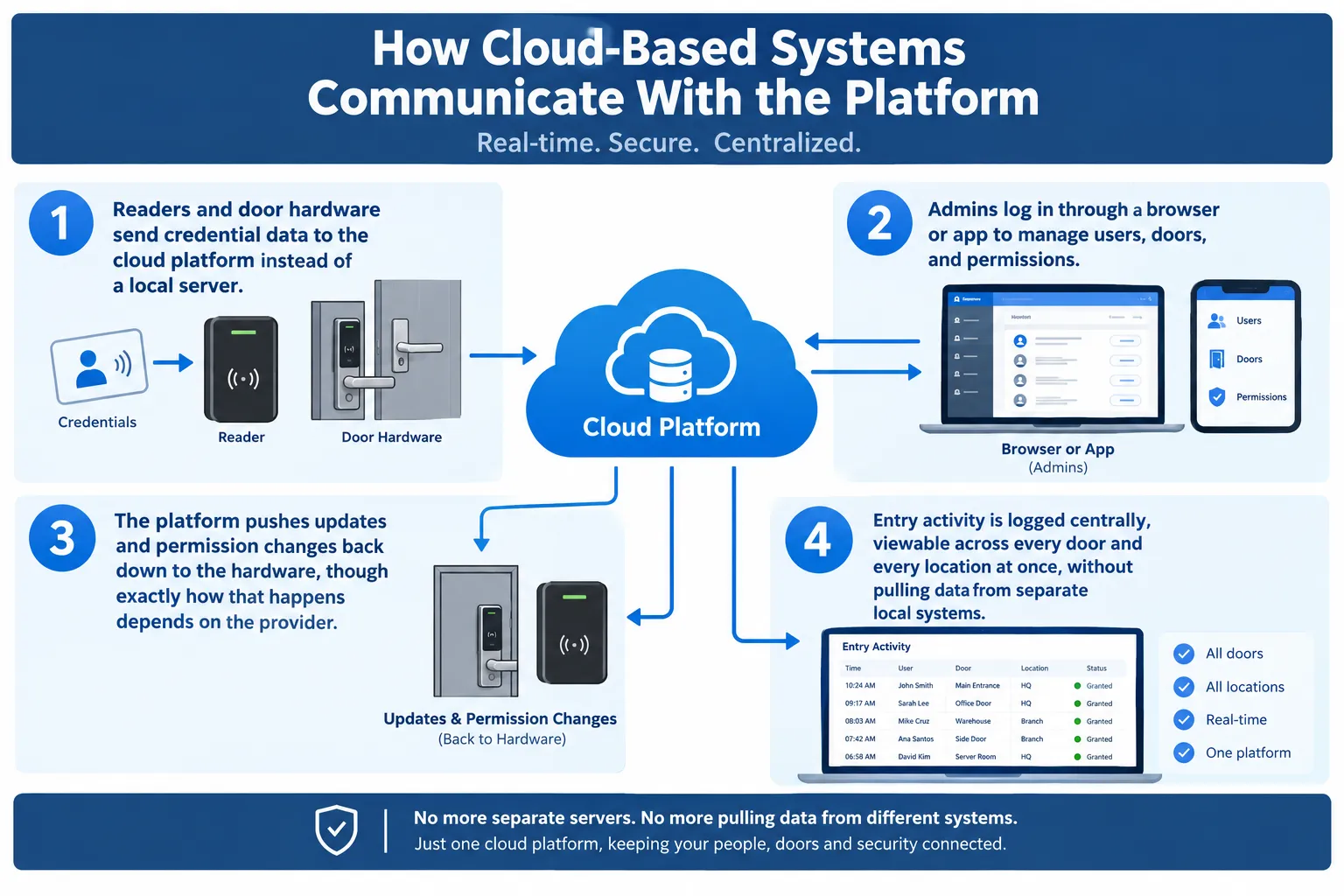
Instead of a control panel wired to one building, cloud-based systems connect door hardware to an online platform, usually over Wi-Fi or a wired internet connection. The building still has physical readers and locks, but the decision-making and record-keeping happen off-site.
How Cloud-Based Systems Communicate With the Platform
- Readers and door hardware send credential data to the cloud platform instead of a local server.
- Admins log in through a browser or app to manage users, doors, and permissions.
- The platform pushes updates and permission changes back down to the hardware, though exactly how that happens depends on the provider.
- Entry activity is logged centrally, viewable across every door and every location at once, without pulling data from separate local systems.
1. Remote Management From Anywhere
Traditional systems tie access management to a physical panel inside the building. If an owner needs to make a change after hours or while traveling, that often means waiting until someone can get to the property, which isn’t always practical for a fast-moving business.
Why Remote Management Matters
A cloud-based platform removes that bottleneck for most day-to-day changes. An owner can grant a contractor temporary access, lock down a compromised door, or check who’s currently inside, often from a phone, whether they’re across the street or across the country. Some systems built around a keypad’s simplicity offer a lighter version of this same remote control.
To see how that works, read What Is Keypad Access Control? How It Works and 6 Places Businesses Use It.
2. Faster Onboarding and Offboarding of Staff
Every business deals with employee turnover, and the gap between someone leaving and their access actually getting shut off is where a lot of security risk lives. That gap tends to be widest with older, panel-based systems that require someone to physically walk to the office.
Why Faster Offboarding Matters
With a cloud dashboard, deactivating a departing employee’s credential often takes just seconds, from any device, once the decision is made. This mirrors what already happens with individually tracked credentials like key fobs, just extended across every door and every location at once.
To see how that credential-level control works on its own, read How Does Key Fob Access Control Work? 5 Things Business Owners Should Know.
3. Streamlined Software and Security Updates
On-premise systems often require a technician visit to install firmware updates or patch a security vulnerability, which means updates get delayed or skipped entirely, sometimes for months at a time.
Why Streamlined Updates Matter
- Many cloud platforms can push updates to connected hardware with little or no need to schedule a visit, though the exact process depends on the provider and service plan.
- Security patches can often roll out faster than with on-premise systems, which may reduce the window a vulnerability stays open.
- In many cases, owners don’t need to manually track which firmware version each door is running.
- New features and integrations can often become available without replacing existing hardware, since many improvements happen on the software side rather than requiring new equipment.
- Support teams can often diagnose and fix a software issue remotely, without a technician needing to visit the property first, depending on the platform.
4. Easier Scaling Across Multiple Locations
A business with one location can manage a single on-premise panel without much hassle. A business with five locations managing five separate panels is a different story entirely, and the administrative overhead grows faster than most owners expect.
Why Easier Scaling Matters
Cloud-based platforms let a single admin manage every door at every location from one dashboard, rather than logging into a different system at each site. It’s part of a broader shift toward centralized, app-based control that’s shown up across home and business security alike, something This Old House touches on in its overview of modern lock technology. Adding a new location typically means provisioning new hardware and connecting it to the existing dashboard, though the exact steps and timeline can vary depending on the platform and how many doors are involved.
5. Detailed, Searchable Entry Logs
Traditional systems often store logs locally, if they store them at all, which makes reviewing an incident from three weeks ago difficult or impossible once local storage cycles out old records.
Why Better Entry Logs Matter
Cloud platforms keep a searchable record of every entry, exportable by date, door, or user. Detailed activity logs are quickly becoming one of the most requested features as buildings move toward connected access control, a trend Angi picks up on in its comparison of smart and traditional lock technology. This record-keeping becomes especially useful when resolving a dispute about who entered a space and when, or when documenting compliance for an insurance or regulatory review.
Is Cloud-Based Access Control Right for Your Business
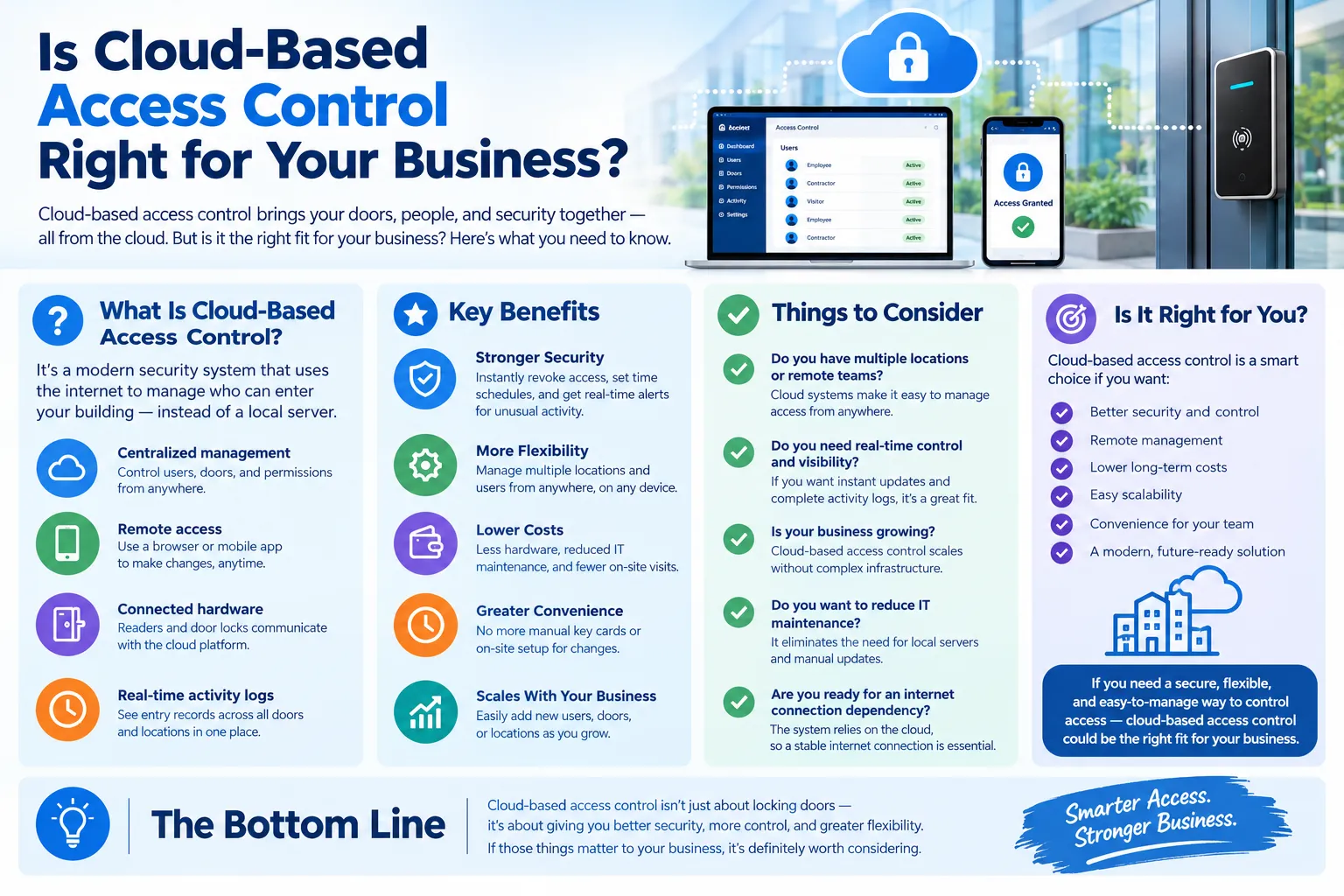
Cloud-based systems aren’t automatically the right choice for every property. A single-location business with low staff turnover and no need for remote management may do just fine with a traditional panel. The businesses that benefit most are the ones dealing with multiple locations, frequent staff changes, or a real need to manage access without being on-site, and matching the system to those actual needs matters more than chasing the newest technology for its own sake.
R&S Erection of Richmond Inc installs and migrates access control systems, including cloud-based platforms, for businesses across Richmond. If you’re weighing whether the switch makes sense for your property, contact us today or give us a call to book a free consultation, and one of our licensed technicians will walk through the options with you.